Welcome to Pondo.
Let’s get you set up.
The Pondo app walks you through setup, step by step. Download it first. This page covers everything else.
Start with the app.
Install the Pondo app, create your account and follow the steps on screen. Keep Pondo, your phone and your Wi‑Fi password nearby.
Requires iOS 15 or later, or Android 10 or later.


Before you start
Five minutes of prep makes setup smooth. Check each of these:
- Any bowl color except black. Pondo reads color and shape against the bowl, so it works with any bowl that isn’t black.
- No colored tank tablets. Remove in-tank cleaners or deodorizers that tint the water, and flush a few times until the water runs clear.
- Your Wi‑Fi name and password. Pondo sends each session to your app over your home network, encrypted. It works on 2.4 GHz and 5 GHz networks.
- Bluetooth on on your phone, which should be close to Pondo during setup.
- A USB‑C cable and charger. Neither is included. Any USB‑C charger works; one with Power Delivery charges faster. Charge the battery fully before you install Pondo. It takes about 6 hours.
What’s in the box
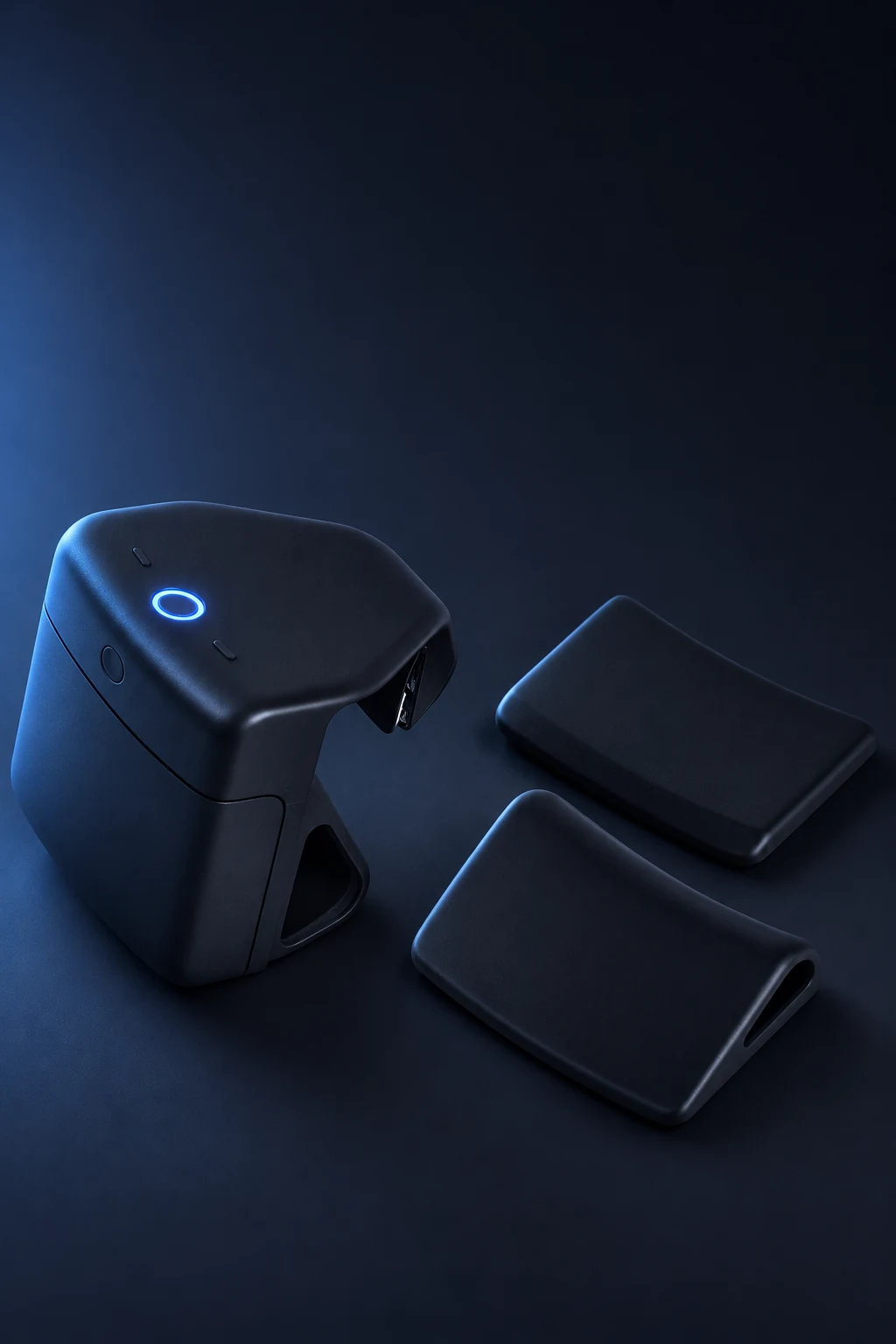
Included
- Pondo
- 3 adapters (bumpers), so Pondo fits virtually any toilet
- The quick-start card that brought you here
Not included
- USB‑C cable
- Wall charger
Setup, step by step
The app guides you through each of these, so you don’t need to memorize them. Here’s what to expect.
- Install the app and create your account. Use the buttons above.
- Charge Pondo. Pop out the battery and charge it with any USB‑C cable (about 6 hours for a full charge), then put it back.
- Pair Pondo with your phone. Press the button on the back of Pondo once to turn it on. Wait about 10 seconds, until the light stops blinking, then press it once more. When the ring blinks blue, the app finds Pondo for you. Keep your phone nearby with Bluetooth on. The app shows you the exact steps on screen.
- Connect Pondo to your Wi‑Fi. Choose your home network in the app and enter the password. A blue wave spins around the ring while Pondo connects.
- Clip Pondo onto the toilet. Use the adapter that fits your rim. No tools, no plumbing.
- Choose how Pondo knows it’s you. Device buttons, phone, or app. See the next section.
Sharing with your household
One Pondo supports up to four people. Each person gets a separate, private profile, and no one can see anyone else’s data. Invite the others from the app with a link, and each of you picks how Pondo knows it’s you:
- Device buttonsPress your user button on Pondo during the session.
- Your phoneKeep your phone paired with Pondo via Bluetooth.
- The appSelect yourself in the Pondo app.
Pondo has two buttons on top. Press left once for User 1, right once for User 2, left twice for User 3 and right twice for User 4. The ring pulses in that person’s color (orange, green, purple or yellow) to confirm.
To see your user number (1 to 4), open Manage Users in the app. If no one presses a button, the session goes to the person whose phone Pondo detects nearby, or to the account’s main user if no phone is nearby. You can reassign any session from the app.
How sessions work
Once Pondo is set up, there’s nothing to log. Use the toilet as you normally would; Pondo analyzes the session and sends it to the profile of the person it’s assigned to.
Your first scores arrive after your first visit. Patterns, like what’s normal for you, what changes after certain foods or habits, build over the following weeks, so the more consistently you use Pondo, the more useful your trends become.
Battery and charging
A full charge lasts about 2 to 3 weeks, depending on use. When it’s time, pop out the battery and charge it with any USB‑C cable. The rest of Pondo stays installed. When the battery is at 10% or less, the ring pulses red three times during a session, and the app lets you know too.
| Battery life | About 2 to 3 weeks per charge, depending on use |
|---|---|
| Charging | Any USB‑C cable and charger (not included); Power Delivery charges faster |
| Full charge | About 6 hours |
| Battery type | Rechargeable lithium‑ion, 44.4 Wh total |
| Storage | Cool, dry place, below 60 °C (140 °F) |
Cleaning
Wipe Pondo with an alcohol wipe, or a damp cloth with a gentle cleaner, as part of your normal bathroom cleaning. Gently wipe the sensor window on the underside so nothing blocks its view of the bowl.
- Don’t submerge Pondo, run it under the tap or spray it directly.
- Avoid abrasive pads and harsh cleaners on the sensor window.
- Clean the bowl as usual, then let it rinse clear afterward, so no colored residue stays in the water.
Troubleshooting
Most problems have a quick fix. Start with these three:
- Check the bowl and the water. A bowl that isn’t black, no tank tablets, and water that runs clear.
- Check the battery. Three red pulses on the ring mean it’s at 10% or less.
- Restart Pondo. Pop out the battery, wait 5 seconds and put it back.
Safety and care
Pondo contains rechargeable lithium‑ion batteries. Treat it like any other battery-powered device:
- Keep it away from heat sources and direct sun; don’t leave it anywhere above 60 °C (140 °F).
- If Pondo is cracked, swollen, unusually hot or smells of burning, stop using it, don’t charge it, keep it away from anything flammable and contact us.
- Don’t open the housing or try to replace the battery packs yourself.
- When Pondo reaches the end of its life, don’t put it in household trash. Take it to an electronics or battery recycling drop-off.
Pondo is a wellness device. It does not diagnose, treat or prevent any disease or medical condition. If something in your scores worries you, talk to a healthcare professional.
Shipping or storing Pondo in bulk? See the product and shipping data sheet.
Privacy and your data
Pondo’s sensor is fixed at a downward angle that frames only the inside of the bowl, not the seat and not the room. An infrared sensor only detects when someone is using the toilet, seated or standing; it doesn’t capture images. Each session is analyzed on the device and in our secure cloud, anonymized and encrypted in transit and at rest.
Your data lives in your own profile. From the app you can export your complete history or delete it permanently.
How Pondo protects your dataHelp, returns and warranty
Something not working? Check Support first. Still stuck? Write us at support@getpondo.com. A person on our team replies within 24 hours.
| Returns | 30 days, refund of the product price |
|---|---|
| Warranty | 1 year |
| Support | support@getpondo.com |
Full terms in our Terms and Conditions. Answers to common questions are in the FAQ.