How can we help?
Find your issue below. Most fixes take a minute. Still stuck? Write to support@getpondo.com and a person on our team will reply within 24 hours.
Setting up for the first time? Start with the user guide.
Start here
These three checks fix most problems.
- A bowl that isn’t black, and clear water. Pondo reads color and shape against the bowl, so it works with any bowl color except black. Tank tablets or deodorizers that tint the water also prevent accurate readings. Remove them and flush until the water runs clear.
- A charged battery. If the ring pulses red three times during a session, the battery is at 10% or less. See battery and charging.
- The latest app, with Bluetooth on. The app requires iOS 15 or later, or Android 10 or later. Update the Pondo app, turn on Bluetooth and keep your phone near Pondo.
What the lights mean
Pondo has a light ring on top, a light underneath that shines into the bowl during a session, and a small green light on the battery.
| White, pulsing | Pondo is turning on. It’s ready in about 10 seconds, when the light stops. | |
|---|---|---|
| White fading to red | Pondo is turning off. | |
| Blue, blinking | Pairing mode: Pondo is looking for your phone. If this comes back during setup, something went wrong; try again from the app. | |
| Blue, breathing | Your phone is connected and setup is in progress. | |
| Blue wave spinning | Joining your Wi‑Fi, calibrating or installing an update. Don’t remove the battery until it stops. | |
| One white pulse | Pondo detected you and started a session. | |
| One orange, green, purple or yellow pulse | The session was assigned to User 1, 2, 3 or 4. See the buttons. | |
| Three red pulses | Battery at 10% or less. It repeats every 30 seconds while someone is in session. Time to charge. | |
| Red, breathing | Sensor error. Restart Pondo. If it doesn’t clear, contact us. | |
| One white pulse when charging | A charger was connected. |
| White, on | A session is running, or Pondo is calibrating. It turns off when the session ends. |
|---|
| Green, blinking | Charging. | |
|---|---|---|
| Green, solid | Fully charged. The light turns off after an hour. |
The buttons
Pondo has one button on the back and two on top, left and right.
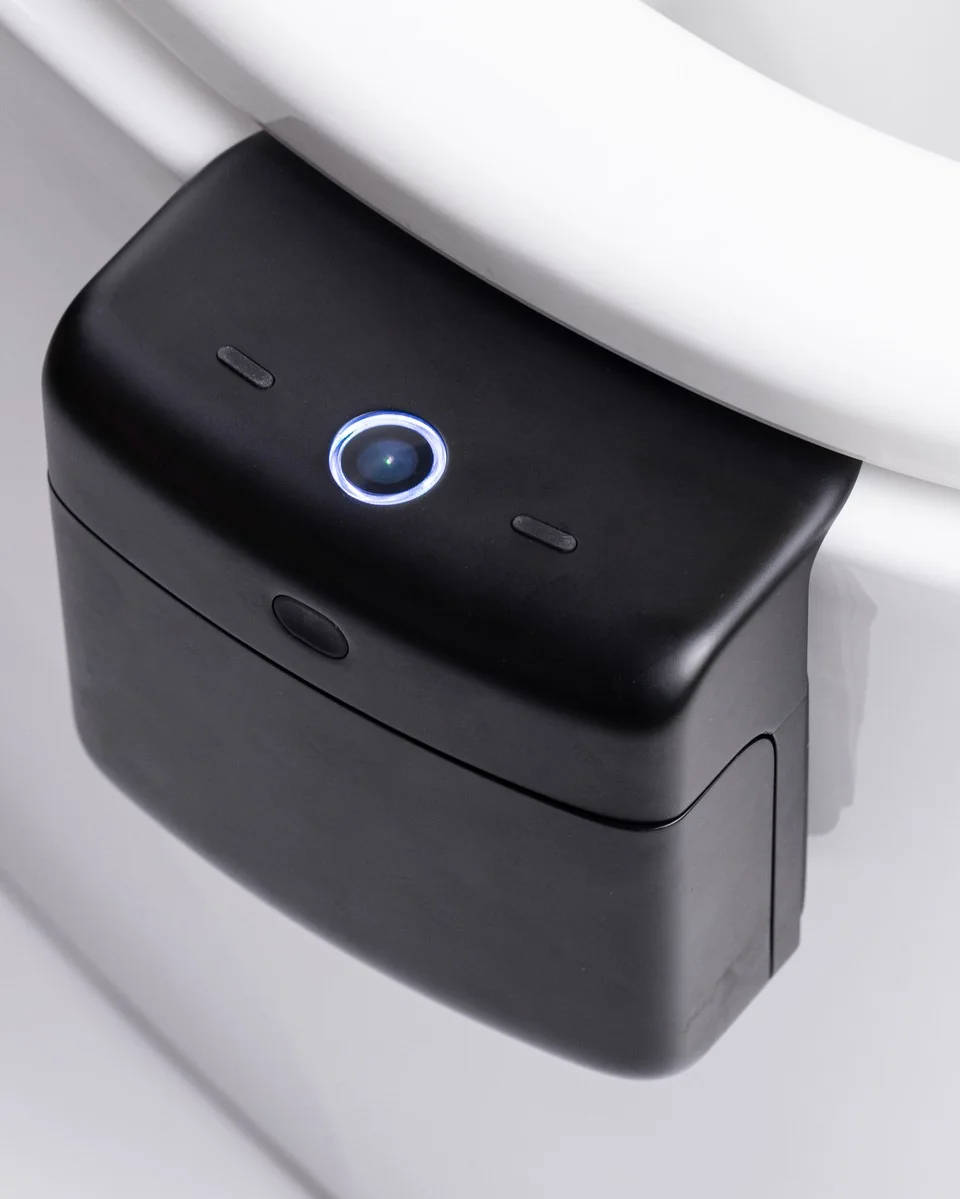
| Back button, press once | When Pondo is off, turns it on. When it’s on, starts pairing mode. |
|---|---|
| Back button, hold 3 seconds | Turns Pondo off. |
| Left button, once | Assigns the current session to User 1 (orange). |
| Right button, once | Assigns the current session to User 2 (green). |
| Left button, twice | Assigns the current session to User 3 (purple). |
| Right button, twice | Assigns the current session to User 4 (yellow). |
Press your user button during the session. The ring pulses in your color to confirm.
To see your user number (1 to 4), open Manage Users in the Pondo app.
Pairing and Wi‑Fi
The app can’t find Pondo
Turn Pondo on with the back button and wait about 10 seconds, until the light stops blinking. Then press the back button once more: the ring blinks blue while Pondo looks for your phone.
Make sure Bluetooth is on, the Pondo app has permission to use it (check your phone’s settings) and your phone is within a few feet of Pondo. Then try again from the app.
Setup keeps going back to blinking blue
That means setup hit an error and Pondo is looking for your phone again. Start setup again from the app, and double-check your Wi‑Fi password.
Pondo won’t connect to Wi‑Fi
While Pondo joins your network, a blue wave spins around the ring. Pondo works on 2.4 GHz and 5 GHz networks. If the wave doesn’t finish, double-check the network name and password (they’re case-sensitive) and make sure Pondo is within range of your router. Bathrooms with thick walls can weaken the signal. Restart your router if other devices are also having trouble.
Is my data safe on my Wi‑Fi?
Pondo uploads each session over your home Wi‑Fi, encrypted in transit. Read more on our Privacy page.
Sessions and users
A session didn’t show up in the app
When you start using the toilet, seated or standing, the ring should pulse white once and the light underneath should turn on. That means a session started. If neither happens, check the battery and restart Pondo.
If the session started but isn’t in the app, check that Pondo is connected to Wi‑Fi and that the session was assigned to someone. Sessions can take a moment to appear; open the app again after a few minutes.
A session went to the wrong person
Open the session in the Pondo app and reassign it to the right person. Next time, press your user button during the session (see the buttons) or keep your phone nearby with Bluetooth on. If no one is identified, the session goes to the account’s main user.
Adding someone to your household
Up to four people can share one Pondo, each with a separate, private profile. Invite them from the Pondo app with a link.
Readings and scores
My readings look off
The most common causes are a black bowl, a tank tablet or deodorizer tinting the water, or a dirty sensor window. Remove any colored cleaners, flush until the water runs clear and gently wipe the sensor window on the underside of Pondo with an alcohol wipe or a damp cloth.
The ring is breathing red
That’s a sensor error. Restart Pondo. If the red light comes back, write to us.
Pondo is a wellness device. It does not diagnose, treat or prevent any disease or medical condition. If something in your scores worries you, talk to a healthcare professional.
Battery and charging
| Battery life | About 2 to 3 weeks per charge, depending on use |
|---|---|
| Charging | Any USB‑C cable and charger; Power Delivery charges faster |
| Full charge | About 6 hours |
| Low battery | Three red pulses on the ring at 10% or less, and a heads-up in the app |
- Pop out the battery. The rest of Pondo stays on the toilet.
- Plug it into a USB‑C cable. The green light on the battery blinks while it charges.
- Put it back when the light is solid green. That takes about 6 hours. The ring pulses white as Pondo turns back on.
The battery runs down faster than expected
Battery life depends on how many people use Pondo and how often. Weak Wi‑Fi also makes Pondo work harder to send data. If it’s far from your router, a closer access point or mesh node can help. If the battery drains in days rather than weeks, write to us.
The battery won’t charge
Check that the green light on the battery blinks when you plug it in. If it doesn’t, try a different USB‑C cable and charger. If it still doesn’t light up, write to us.
Restart or remove Pondo
Restarting fixes most freezes, sensor errors and missed sessions.
- Pop out the battery.
- Wait 5 seconds.
- Put the battery back. The ring pulses white, and Pondo is ready in about 10 seconds.
Remove Pondo from your account
In the Pondo app, go to Settings → Device → Remove. Do this before giving Pondo to someone else or setting it up from scratch.
Returns and warranty
| Returns | 30 days, refund of the product price |
|---|---|
| Warranty | 1 year |
| To start either | Write to support@getpondo.com |
Full terms in our Terms and Conditions.
Still stuck? Write to us.
A person on our team replies within 24 hours.
support@getpondo.comTo help us fix it faster, include:
- The email you ordered with, or your order number
- Your phone model and Pondo app version
- What the light on Pondo is doing
- A photo of Pondo on your toilet, if it’s about fit or readings